Why Small Businesses Need a Mobile POS System
Running a small business means handling sales quickly, keeping track of inventory, and providing customers with a fast and reliable checkout process. A mobile POS system (mPOS) allows you to accept payments without needing a bulky register. If you’ve ever wondered, “Can I use my phone as a POS system?”, the answer is yes! Many businesses now use smartphones and tablets to process payments, track sales, and manage customers on the go.
What is a Mobile POS System?
A mobile phone Point of Sale system is a software-based solution that enables businesses to accept payments through mobile devices such as smartphones and tablets. It functions similarly to a traditional cash register but offers added flexibility by using cloud-based technology. A mobile Point of Sale system can:
- Process credit card, debit card, and contactless payments.
- Track inventory in real-time.
- Generate digital receipts.
- Connect with customer relationship management (CRM) tools.
- Integrate with accounting software.
What’s the Difference Between Android POS and mPOS?
- Android POS refers to a complete point-of-sale system that runs on an Android device, including both hardware and software.
- mPOS (mobile POS) is a broader term that includes any POS system running on a mobile device, including Android and iOS devices.
How Does a Mobile POS Machine Work?
A mobile POS machine transforms your mobile device into a payment terminal. Here’s how it functions:
- Install a POS App – Download the app from the provider’s website or app store.
- Connect a Card Reader – Some POS systems use Bluetooth or plug-in card readers to process card payments.
- Set Up Payment Processing – Link your POS system to a bank account or payment processor.
- Start Accepting Payments – Use your phone, tablet, or dedicated POS hardware to complete sales.
- Track Sales and Inventory – Many POS systems automatically update inventory and generate reports.
If you’re asking, “Can I use my mobile as a POS?”, most smartphones and tablets support POS applications, but it’s best to check compatibility before purchasing a card reader.
Benefits of a Mobile POS System for Small Businesses
- Lower Costs – Traditional POS systems require expensive hardware, whereas mobile POS systems work with existing devices.
- Portability – Accept payments anywhere, whether at a storefront, pop-up shop, or outdoor market.
- Faster Transactions – Reduce customer wait times with tap-and-go payments and digital receipts.
- Real-Time Inventory Tracking – Stay on top of stock levels without manual counting.
- Integration with Other Business Tools – Sync with accounting, CRM, and eCommerce platforms.
How Much Does a Mobile POS System Cost?
The cost of a mobile POS system depends on the provider, features, and transaction fees:
- Basic Plan – Free to $10/month (transaction fees apply).
- Mid-Level Plan – $30–$80/month, includes inventory tracking and customer management.
- Advanced Plan – $100+/month for full integration with accounting and eCommerce tools.
If you’re looking for an affordable mobile POS system for a small business, start with a free plan and upgrade as needed.
Top 5 Mobile POS Systems for Small Businesses
1. Square POS
- Free to start, with a low-cost card reader.
- Ideal for retail, food service, and small vendors.
- Features include inventory tracking, sales reports, and customer management.
2. Shopify POS
- Best for businesses selling both online and in-store.
- Includes seamless integration with Shopify’s eCommerce platform.
- Monthly plans start at $29.
3. Clover Go
- Customizable POS system with various hardware options.
- Works for restaurants, retail stores, and service providers.
- Hardware costs range from $49 to $1,349.
4. Lightspeed POS
- Designed for retail and hospitality businesses.
- Advanced inventory management and analytics.
- Monthly pricing starts at $69.
5. PayPal Zettle
- Ideal for businesses already using PayPal.
- No monthly fees; only pay per transaction.
- Supports tap, chip, and swipe payments.
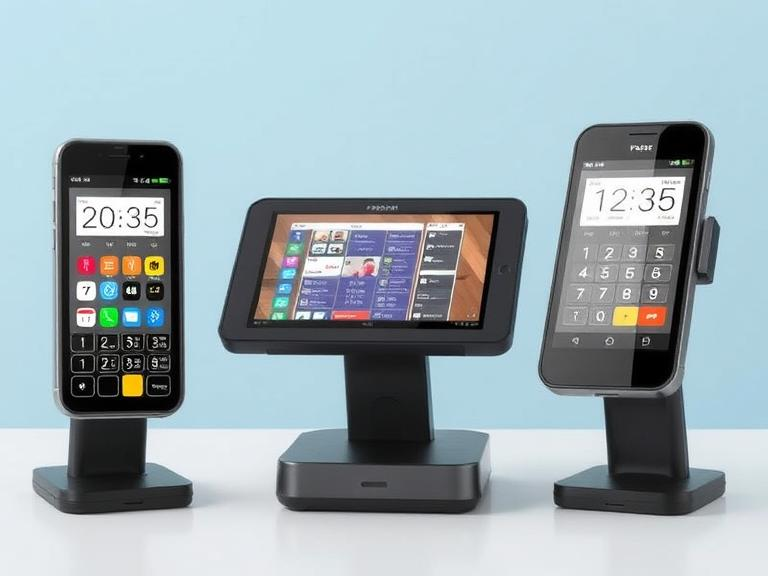
How to Convert Your Mobile into a POS Machine
Steps to Get Started:
- Choose a POS App – Select a provider like Square, Clover, or Shopify.
- Download & Install the App – Some Android users may ask, “How to install APK on Android POS?” Many providers offer APK files for manual installation.
- Get a Card Reader – Some POS companies provide free readers, while others charge a small fee.
- Set Up Payments – Connect your bank account and configure payment options.
- Start Selling – Accept card, cash, and mobile payments instantly.
Can I Use a Tablet as a POS?
Yes! A tablet provides a larger screen for better visibility and works well with receipt printers, barcode scanners, and cash drawers.
Does a POS System Use a SIM Card?
Some mobile POS systems do! If you’re wondering, “Does POS use SIM?”, certain systems, known as SIM POS systems, use mobile networks instead of Wi-Fi. These are especially useful for businesses that operate in areas with unreliable internet connections or for those who frequently sell products at outdoor markets, food trucks, or remote locations.
SIM POS systems allow businesses to stay connected to their payment processors, ensuring transactions go through smoothly even when Wi-Fi isn’t available. They typically work with 4G or 5G networks, offering a stable and secure way to process payments. Some providers offer SIM cards as part of their service, while others let you use your own data plan. If you often sell in locations without stable internet, a SIM-based POS system could be a valuable investment.
What is Automated POS?
An automated POS system is designed to handle transactions and inventory updates without requiring constant manual input. Instead of entering each sale into a log or updating stock levels by hand, the system does everything automatically. Businesses looking for efficiency should choose POS systems with automation features.
For example, an automated POS system can track sales trends, notify you when stock is low, and generate financial reports in real-time. Some systems even offer AI-driven analytics that help businesses optimize pricing and promotions based on past sales data. Automation reduces human errors, improves efficiency, and allows business owners to focus on customer service and growth rather than managing tedious backend tasks.
How to Connect Phone Data to a POS System
If you don’t have access to a stable Wi-Fi connection, you can still use your mobile POS system by connecting it to a mobile data network. Here are the different ways to do it:
- Use mobile data with a SIM card – If your POS system supports SIM cards, you can insert one with a data plan to stay connected.
- Tether from another device via a mobile hotspot – If you have a smartphone with a strong data connection, you can create a Wi-Fi hotspot and connect your POS device to it.
- Choose an offline-capable POS system – Some POS systems allow you to process transactions offline and sync data once you’re back online. This is a great option for businesses that frequently operate in areas with poor connectivity.
Using phone data for a POS system ensures uninterrupted transactions, which is crucial for businesses that operate in temporary setups like trade shows, pop-up stores, or food stalls.
Why Mobile POS Devices Are the Ultimate Tool for Small Businesses
A mobile POS solution is a system that allows businesses to accept payments using a smartphone, tablet, or dedicated POS hardware. Unlike traditional cash registers, mobile POS solutions are cloud-based, offering greater flexibility and real-time data access. Businesses of all sizes, from street vendors to retail chains, benefit from using mobile POS solutions to streamline sales and enhance customer experiences.
Small businesses need flexible payment solutions that fit their unique needs. Mobile POS devices are game-changers because they allow businesses to accept payments anywhere, eliminating the need for a fixed checkout counter. Whether you run a food truck, a retail shop, or provide home services, having a mobile POS device ensures that you never miss a sale.
These devices connect to smartphones or tablets via Bluetooth or USB and support various payment methods, including credit cards, debit cards, and digital wallets like Apple Pay and Google Pay. Some models even come with built-in receipt printers and barcode scanners, making them a complete sales solution.
One of the biggest advantages of mobile POS devices is real-time transaction processing. Payments are instantly recorded, reducing errors and streamlining bookkeeping. They also integrate with inventory management systems, automatically updating stock levels after each sale. This is especially useful for businesses with fast-moving products.
Security is another key factor. Most mobile POS devices come with encryption technology and fraud prevention features, ensuring safe transactions for business owners and customers. With their affordability, ease of use, and convenience, mobile POS devices help small businesses operate efficiently, provide better customer service, and scale their operations without hefty investments.
What is a POS Simulator?
A POS simulator mimics the functions of a real POS system for training and software testing. While it’s mainly used by developers to test new POS features, some business owners and employees also use simulators to familiarize themselves with how a system works before implementing it in a real business environment.
POS simulators allow businesses to practice handling transactions, refunds, and inventory management without making actual financial transactions. This is especially useful for training new employees who need to learn the POS system without the risk of making errors that affect real sales data. Some POS providers offer built-in simulator modes within their apps, allowing businesses to test functionality before committing to a full system.
Final Thoughts: Picking the Right Mobile POS System
A mobile POS system for iPhone, Android, or tablet makes running a small business easier and more flexible. Whether you’re a shop owner, market vendor, or service provider, having a reliable and portable POS system helps you manage sales, track inventory, and improve customer experience effortlessly.
Before choosing a POS system, consider factors like cost, features, compatibility with your device, and whether you need SIM-based connectivity. Think about where and how you’ll be using it—do you need a basic system for occasional sales, or a full-featured solution for a busy store? Taking the time to evaluate different options will help you find the best fit for your business needs.
Ready to start? Pick a POS app, set up your phone, and begin accepting payments today! Need help choosing the best option? Compare providers and find the one that fits your business best.
FAQs
- Can I use my phone as a POS system?
Yes! Install a POS app, connect a card reader, and start accepting payments on your phone. - How much does a mobile POS system cost?
Costs range from free to $100+ per month, depending on features and transaction fees. - Does a POS system need Wi-Fi?
Not always. Some systems use a SIM card or allow offline transactions. - What’s the difference between Android POS and mPOS?
Android POS is a dedicated system, while mPOS runs on any mobile device. - Can I use a tablet as a POS system?
Absolutely! Many POS apps work on tablets, offering a larger screen for better usability.